What is OPUS?
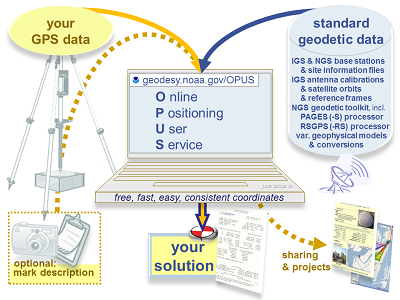
NOAA's Online Positioning User Service (OPUS) provides free access to high-accuracy National Spatial Reference System (NSRS) coordinates. OPUS uses the same software which computes coordinates for the nation's geodetic control marks and the NOAA CORS Network (NCN).
To use OPUS, simply upload a GPS data file (collected with a survey-grade GPS receiver) to the OPUS upload page. Your computed NSRS position will be emailed to you. If you choose, your position can also be shared publicly on the NGS website, or added to a larger survey project.
Helpful resources:
- Understanding OPUS
- Using OPUS-Projects to Submit GPS Surveys to NGS
- Observer Field Log for GNSS Surveys
- Bluebooking: Submit GPS data to NGS through this process. NGS will publish the coordinates on survey mark datasheets.
To use OPUS, simply follow these 5 steps:
1. Upload your data file
Static GNSS data files must meet the following requirements:
- Have dual-frequency GPS (L1/L2) full wavelength carrier phase observables
- Include static data only (the antenna must remain unmoved throughout the observing session)
- Include a minimum of 15 minutes and maximum of 48 hours of data, not crossing UTC midnight more than once
- Files under 2 hours must include both P2 observables and either P1 or C1 observables
- Record data at intervals of 1, 2, 3, 5, 10, 15, or 30 seconds
Accepted data formats include:
- NEW! for projects only: GVX-formatted real-time kinematic (RTK) and post-processed vectors.
- RINEX 3
- RINEX 2
- Compressed UNIX, gzip, pkzip, and Hatanaka formats.
Note, compressed files are processed sharing one antenna type+height entered at upload. - Many other raw data formats
A few notes on static data types:
- OPUS only uses GPS observables (even if the file contains other GNSS observables).
- OPUS decimates all recording rates to 30 seconds.
- OPUS accepts all mask angles, but only satellites more than 10° above the horizon are used.
2. Select your antenna type
To find the correct antenna type, browse antenna calibrations. Correctly selecting your antenna will help OPUS apply the appropriate antenna calibration model to counter the unique measurement biases inherent in each antenna's design. Choosing an incorrect antenna may result in a height error as large as 80 cm and a horizontal error up to 1 cm.
3. Enter your ARP height
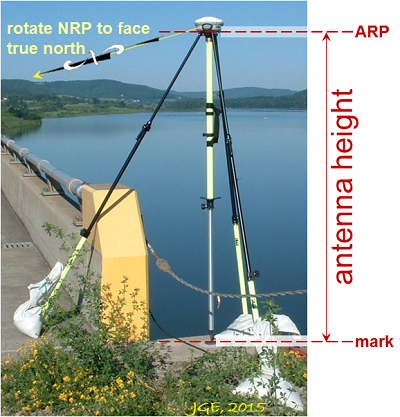
Enter the vertical height (in meters) of your Antenna Reference Point (ARP) above the mark. See antenna calibration for a drawing of the ARP for your antenna (usually the center of the base or tripod mount).
4. Enter your email address
Your OPUS solution will be sent to this address when processing is complete.
5. Select additional options
By clicking the 'Options' button, you can:
- Customize your solution format
- Choose your base stations
- Choose your State Plane Coordinate System (SPCS) zone
- Include a project identifier
- Choose to share your solution publicly
- Set a profile:
- If you choose to set a profile, OPUS will save your email, antenna type and height, and options used.
- Subsequent uploads will require only your email and a data file to apply your customized defaults.
- Caution! If you choose to set a profile, your selections will override the optimized defaults for all subsequent uploads.
How does OPUS processing work?
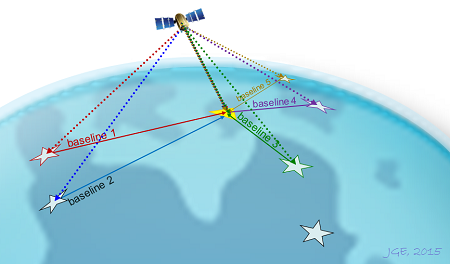
Depending on the duration of your data file, OPUS will use either static or rapid-static processing:
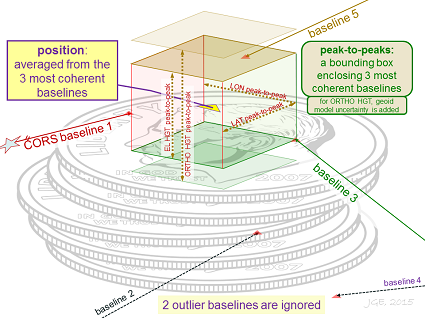
- Static: Files that are 2 to 48 hours in duration are processed using PAGES static software. Your coordinates are the average of three independent, single-baseline solutions, each computed by double-differenced carrier-phase measurements from one of three nearby CORSs.
- Rapid-Static: Files that are 15 minutes to 2 hours in duration are processed using RSGPS rapid-static software. Rapid-static processing has stricter requirements for data continuity and geometry; in some remote areas of the country OPUS-RS may not work.
 OPUS Accuracy
How accurate is it?
Under normal conditions, most positions can be computed to within a few centimeters. However, estimating the accuracy for a specific solution is difficult because formal error propagation is notoriously optimistic for GPS reductions. User errors (such as misidentification of antenna or ARP height) cannot be detected. Local multipath or adverse atmospheric conditions may also negatively impact your solution.
Static: For each coordinate (X, Y, Z, Φ, λ, h, and H), static processing provides the range of the three individual single baselines, also called peak-to-peak errors. These ranges include any error from the base station coordinates.
Rapid-Static: The best estimates of coordinate errors are the standard deviations reported by single baseline analysis. Our experiments indicate that the actual error is less than these estimated accuracies more than 95 percent of the time.
Improving your OPUS results:
Follow these guidelines to improve the quality of your OPUS solution:
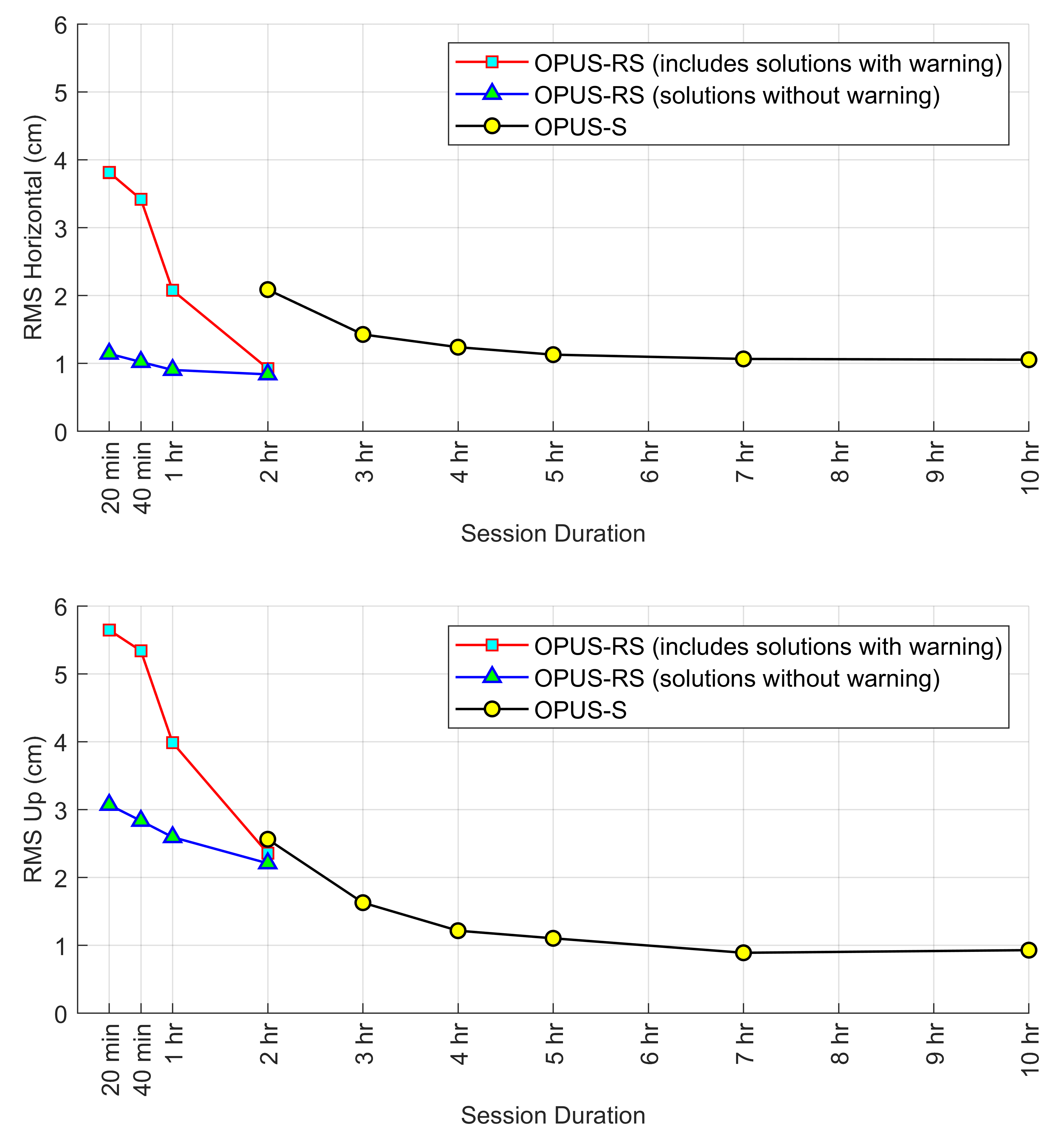
- Observe longer: A longer session provides OPUS a better opportunity to accurately fix ambiguities and mitigate multipath error. The figure below shows the correlation between session duration and accuracy. Please note: this figure is a result of a published regional study, and the performance of OPUS may be slightly better or worse in your geographic location. For details on this regional study, see Gillins, D.T., Kerr, D., and Weaver, B. (2019). "Evaluation of the Online Positioning User Service for Processing Static GPS Surveys: OPUS-Projects, OPUS-S, OPUS-Net, and OPUS-RS," ASCE Journal of Surveying Engineering, 145(3): 05019002.
- Observe again: A second independent observation which yields a similar solution is an easy way to increase confidence in your results. To maximize independence between observations:
- Use a different observer
- Use different equipment
- Observe on a different day, at a different time of day
- Wait a day before submitting your file: OPUS will use the best CORS and orbits available at the time you upload your data. While most CORS are archived within 30-minutes past the hour, some aren't available until the next day. If you process your data in less than 24 hours after collection, OPUS will use Ultra-Rapid orbits. Rapid orbits, available at 17:00 UTC the next day, will offer a slight improvement in your accuracy. Final orbits, available weeks later, offer only slight benefit to solutions in areas with usable CORS nearby.
What does a quality solution look like?
The most accurate OPUS solutions have the following characteristics:
- Orbits used are precise or rapid
- Over 90% of observations are used
- Over 50% of ambiguities are fixed
- The correct antenna type and ARP height are entered
- For OPUS-S:
- Overall RMS is less than 3 cm
- Peak-to-peak errors are less than 5 cm
- For OPUS-RS: the solution contains no warning messages
Please note: OPUS-RS may perform poorly or fail during periods of high ionospheric disturbance or during the passage of a strong weather front. In general, it is best to avoid collecting GPS data during these events. To avoid collecting data during a geomagnetic storm, see NOAA's Space Weather Prediction Center, which issues geomagnetic storm alerts.
Solution Formats
Two solution formats are available:
- Standard: a sample standard solution report is provided below.
- Extended: in addition to the information in the standard solution, the extended solution also includes more detailed information about the base stations used and solution statistics.
| NGS OPUS SOLUTION REPORT ======================== 9999 OPUS ALERTS, IF ANY ... OPUS DISCLAIMER Error and warning messages are appended here |
|
| _____ USER: your.email@domain.com USER: Your.email@domain.com Your email address | DATE: ____ April 25, 2022 DATE: April 25, 2022 The date and time you used OPUS |
| RINEX FILE: 2438057p.22o RINEX FILE: 2438057p.22o Your data file name, in RINEX format |
TIME: ______ 17:28:17 UTC TIME: 17:28:17 UTC Coordinated Universal Time |
| _ SOFTWARE: page5 2008.25 master270.pl SOFTWARE: page5 2008.25 master270.pl 16032 The software we used |
START: 2022/02/26 15:14:00 START: 2022/02/26 15:14:00 The first observation in your data file |
| EPHEMERIS: igs21986.eph [precise] EPHEMERIS: igs21986.eph [precise] The orbit file we used |
STOP: 2022/02/26 19:47:00 STOP: 2022/02/26 19:47:00 The last observation in your data file |
| _ NAV FILE: brdc0570.22n NAV FILE: brdc0570.22n The navigation file we used |
OBS USED: 10338 / 10976 : 94% OBS USED: 10338 / 10976 : 94% Usable / total observations in your data file |
| _ ANT NAME: TRMR8_GNSS NONE ANT NAME: TRMR8_GNSS NONE Your selected antenna type |
# FIXED AMB: ___73 / ___75 : 97% # FIXED AMB: 73 / 75 : 97% For static: Fixed / total ambiguities in your data file.
|
| ARP HEIGHT: 2.2501 ARP HEIGHT: 2.2501 Your selected antenna height |
OVERALL PHASE RMS: ______ 0.015 (m) OVERALL PHASE RMS: 0.015 (m) For static: overall root mean square (RMS) error for the doubly-differenced iono-free carrier phase observables for the three single baseline solutions. |
| REF FRAME: NAD_83(2011)(EPOCH:2010.0000) _________ ITRF2014 (EPOCH:2022.1554)
NAD83 and ITRF2014 Your position: Earth-centered cartesian coordinates in the International Terrestrial Reference Frame (ITRF). |
|
| ________ X: 1342663.281(m) 0.002(m) | 1342662.331(m) 0.002(m) |
| ________ Y: -4680480.882(m) 0.006(m) | -4680479.449(m) 0.006(m) |
| ________ Z: 4105726.867(m) 0.005(m) | 4105726.841(m) 0.005(m) |
| ______ LAT: 40 19 37.75141 0.003(m) LAT: 40 19 37.75141 0.003(m) Latitude and accuracy |
40 19 37.78518 0.003(m) 40 19 37.78518 0.003(m) Latitude and accuracy |
| ____ E LON: 286 0 22.68025 0.004(m) E LON: 286 0 22.68025 0.004(m) Longitude and accuracy |
286 0 22.65829 0.004(m) 286 0 22.65829 0.004(m) Longitude and accuracy |
| ____ W LON: 73 59 37.31975 0.004(m) W LON: 73 59 37.31975 0.004(m) Longitude and accuracy |
73 59 37.34171 0.004(m) 73 59 37.34171 0.004(m) Longitude and accuracy |
| ___ EL HGT: ___ -30.128(m) 0.006(m) EL HGT: -30.128(m) 0.006(m) Ellipsoidal height and accuracy |
-31.395(m) 0.006(m) -31.395(m) 0.006(m) Ellipsoidal height and accuracy |
| ORTHO HGT: _____ 2.554(m) 0.049(m) ORTHO HGT: 2.554(m) 0.049(m) The orthometric height |
[NAVD88 (Computed using GEOID18)] [NAVD88 (Computed using GEOID18)] Orthometric height datum, and geoid model used to compute it. |
| UTM COORDINATES UTM COORDINATES Additional information on UTM COORDINATES |
STATE PLANE COORDINATES STATE PLANE COORDINATES Additional information on STATE PLANE COORDINATES |
| UTM (Zone 18) UTM (Zone 18) UTM Zone ID |
SPC (2900 NJ) SPC (2900 NJ) State Plane Coordinate Zone ID |
| Northing (Y) [meters] 4464554.902 | 165960.156 |
| Easting (X) [meters] 585486.862 | 193023.668 |
| Convergence [degrees] 0.65126667 Convergence [degrees] 0.65126667 Meridian convergence |
0.32765833 |
| Point Scale _________ 0.99968996 | 0.99992278 |
| Combined Factor _____ 0.99969468 | 0.99992751 |
| US NATIONAL GRID DESIGNATOR: 18TWK8548764555(NAD 83) US NATIONAL GRID DESIGNATOR: 18TWK8548764555(NAD 83) The US National Grid coordinates and referenced datum are reported, if applicable |
|
| BASE STATIONS USED BASE STATIONS USED The CORS we used as reference stations and |
|
| PID _______ DESIGNATION | LATITUDE __ LONGITUDE __ DIST(m) |
| DI3830 NJTP PISCATAWAY CORS ARP | N403225.841 W0742804.135 46686.9 |
| DH3768 NJMT NJMT CORS ARP | N404747.350 W0742859.339 66591.5 |
| DI1077 NJOC NJOC CORS ARP | N395710.023 W0741136.593 44920.6 |
| NEAREST NGS PUBLISHED CONTROL POINT | |
| DM6970 853 1942 D TIDAL | N401937.751 W0735937.320 ____ 0.0 |
| This position and the above vector components were computed without any knowledge by the National Geodetic Survey
regarding the equipment or field operating procedures used. OPUS automated disclaimer |
|
Error Messages
- I got a warning message that the IGS Precise Orbit was not available at the time of processing, but the "rapid" was used. What does that mean?
- We will not have the "final" IGS
Precise orbit until the International GPS Service (IGS) completes
a full week (Sunday through Saturday). This final precise orbit
is the combination of seven analysis centers worldwide.
It can take these analysis centers several days to upload the orbit to the IGS
so the availabilty of a Sunday orbit can be 19 days.
The IGS rapid orbit is used in the absence of the IGS precise orbit.
However, this is not cause for alarm since the IGS rapid is nearly
as "good" as the IGS precise. How does this relate to positions on the ground?
Since most OPUS baselines are less than several hundred kilometers, the differences between using the IGR (rapid orbit) and the IGS (precise orbit) is barely detectable if at all. Because of this, OPUS has discontinued this warning message (1/1/2004). For more information see IGS.
- Some of my attempts to submit data generates a return email saying, "The observations to slip ratio is too low. There were an unusually high number of cycle slips in the data set. Aborting ..." (Code 1012). What does this mean, and how can I correct it?
- This error message primarily indicates
that your carrier phase data set contains too many cycle slips
to assure an automated hands-off processing to obtain accurate
results. The data may still be useful, but will require human
intervention to efficiently resolve the cycle slips. Perhaps
nearby radio interference or obstructions have caused an unusual
amount of cycle slips.
- I am trying to upload a RINEX file and I am getting a message that there are illegal characters in the file name -- what am I doing wrong?
- The problem is probably not with the
file name, but with the path name. OPUS is run on a UNIX machine,
and it can only read path names that contain numbers, letters,
the period, dash, and the underscore. If you move your file
to another directory, it should be able to be uploaded.
FAQs - Static
- I uploaded data. Why no response?
- Solutions are usually sent within a
few minutes, but it may take more than an hour to complete
if traffic is heavy or your file is large. You will eventually
receive either a solution or a failure message. Take care to
enter your email address correctly and check your spam filters.
- My nearest CORS weren't used. Why not?
- OPUS tries to use your nearest CORS,
but tests the integrity of each dataset, and will expand the
search area until enough quality data are found. Also note
some CORS data are not available until the following day. You
may use OPUS options to force include or exclude specific CORS.
- Is antenna required? If I select "NONE" will it use the L1 phase center?
- While strongly recommended, if you leave the antenna as NONE your data will be processed with no offsets
applied, resulting in a position a few centimeters above or below the L1 phase center.
Ignoring your antenna's phase center variations will be interpreted as changes in tropo delays,
causing errors in the tropo parameters which will degrade your solution.
- What is the ARP height for Leica antenna model SR 399, with GRT44 tripod mount?
- If you have this type of antenna mounting,
the ARP height can be determined by using the following equation:
Height of ARP (meters) = 0.350 + tape measurement (meters)
"Tape Measurement" is the distance in meters from
the bottom of the hook in the antenna mounting
to the monument.
- Why do so many antennas include the term "NONE"? What are SPKE, SNOW, SCIS, etc?
- A NONE suffix means no radome, a shell occasionally used to protect permanent antenna installations.
OPUS identifies antenna types using the 20-character antenna+radome codes adopted by the International GNSS Service (IGS);
see antenna calibration for more information.
- My NAD83 coordinates are missing. Why?
- Sometimes OPUS uses CORS from outside
the NGS CORS network that only have IGS reference frame positions and no listed
NAD83 positions. Your resulting positions will be just as good
as if all CORS were used, except the NAD83 positions will not
be listed. You may wish to go to the NGS home page, click on
"Products and Services", and download the program HTDP.
This program converts positions between different reference frames.
- How do the NAVD88 heights from GEOID18 compare with heights from GEOID12B, GEOID09, GEOID03, or GEOID99?
- Newer geoid models provide improved
orthometric height accuracy. Upgrade your older GPS heights
as follows:
NAVD88new geoid =
NAVD88old geoid - new geoid ht + old geoid ht.
Use the interactive computations tools within geoids or VDatum to compute geoid heights for your project area.
- contact OPUS
Sharing your OPUS solution
Why share?
Your data helps maintain local ties to the National Spatial Reference System (NSRS). Your shared solutions will also help your community prepare for the NSRS modernization in 2022 by contributing to the GPS on Bench Marks for the Transformation Tool campaign (GPS on BM). The Transformation Tool will enable conversions from current vertical datums to the new North American-Pacific Geopotential Datum of 2022 (NAPGD2022). To see examples, check out shared solutions near you.
To share your OPUS solution publicly:
- Upload your data file to OPUS
- After entering and verifying your antenna type and ARP height, click the button
- For the option share my solution, choose Options >
OPUS shared solutions must meet the following requirements:
- Your GPS data file must be 4 hours or longer.
- Your mark must be a permanent mark of public interest.
- The mark must be durable, have a stable setting, and good satellite visibility.
- Include a description and photos to help others find your mark.
- Your shared solution must be a high-quality solution:
- ≥ 70% observations used and ambiguities fixed
- ≤ 3 cm RMS
- ≤ 4 cm peak-to-peak error ranges for latitude and longitude
- ≤ 8 cm peak-to-peak error range for ellipsoid height
Helpful resources:
- Preview the OPUS description form help file.
- Access the Observer Field Log for GNSS Surveys
- Tutorial: How to Submit an OPUS Share Observation
- Lesson: GNSS Positioning: Survey Planning and Data Acquisition
- Lesson: Foundations of Global Navigation Satellite Systems (GNSS)
- Video: Best Practices for Minimizing Errors During GNSS Data Collection
OPUS Planned Improvements
NGS continues to enhance the Online Positioning User Service (OPUS). The projects described below are in progress to further develop OPUS-Projects so that GNSS control surveys
can be more efficiently completed according to NGS standards and guidelines, assessed for quality, submitted for review, and published in the NGS Integrated Database (IDB).
See also the 03 February 2021 OPUS User Forum - Where We Are and Where We're Going
OPUS to add GNSS Constellations
The NGS processing engine for static surveys, PAGES, is being rewritten to incorporate GNSS constellations besides GPS, as well as other housekeeping improvements.